- Home Page /
- Electronics /
- Computer Accessories /
- Computer Accessories & Peripherals /
- Keyboards, Mice & Accessories /
- Mice /
- acer Wireless Mouse for Laptop, 2.4GHz Comput...
0 ratings





Item #:
142129418
acer Wireless Mouse for Laptop, 2.4GHz Computer Mouse 3 Adjustable DPI Office Cordless USB Mice with USBA Receiver, 6 Buttons, 1600 DPI, Medium to
86% of respondents would recommend this to a friend
Item #:
142129418
SBD 144
Price Details
Excluding Shipping & Custom charges ( Shipping and custom charges will be calculated on checkout )
*All items will import from US
22%
In stock
 Imported from USA store
QTY:
Order now and get it around Friday, June 26
Secured transaction
Ubuy works hard to protect your security and privacy. Our advanced payment security system ensures confidentiality by encrypting your information during transmission using AES (Advanced Encryption Standards) and SSL (Secure Socket Layer) protocols. Your payment details are 100% secure as we do not share your payment details with third party sellers.
Our Top Logistics Partners


Efficiently navigate your tasks with our advanced wireless mouse featuring optical tracking and quick navigation buttons.

Fast
Shipping

Free
Return*

Secure Packaging

100% Original Products

PCI DSS Compliance

ISO 27001 Certified


Note: Step Down Voltage Transformer required for using electronics products of US store (110-120). Recommended power converters Buy Now.


What Stands Out
High Precision
With 1600 DPI and three adjustable levels, this mouse ensures precision and speed, making it ideal for both office work and gaming, catering to diverse user needs.
Ergonomic Design
Designed for medium to large hands, this mouse provides comfort during prolonged use, helping to reduce strain and improve productivity for extended periods.
Versatile Connectivity
The 2.4GHz wireless connection offers reliable performance with minimal lag, while the USB receiver ensures compatibility across PC, laptop, and desktop devices, enhancing convenience for users.
Product Details
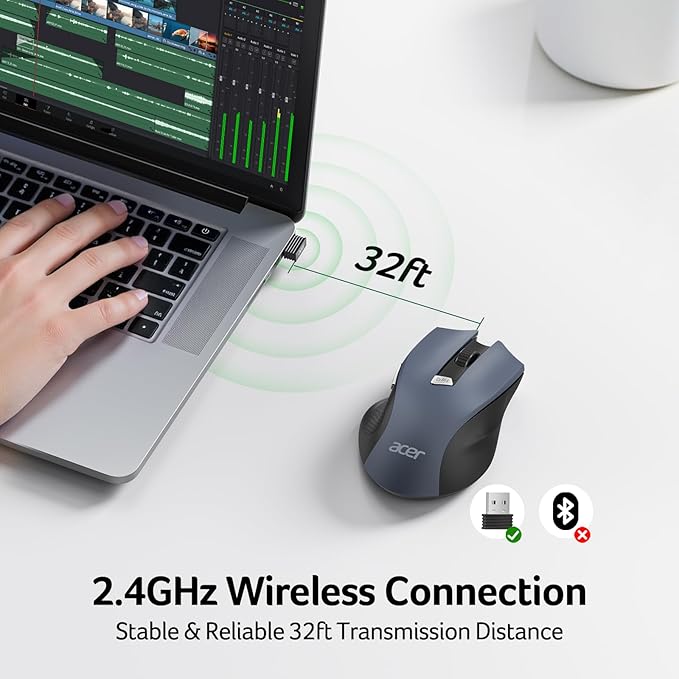
- 【Plug and Play for Home Office】The wireless computer mouse features 2.4GHz connectivity, delivering a stable, interference-free connection up to 32ft. Designed for 𝐦𝐞𝐝𝐢𝐮𝐦 𝐭𝐨 𝐥𝐚𝐫𝐠𝐞 𝐬𝐢𝐳𝐞𝐝 𝐡𝐚𝐧𝐝𝐬, it ensures comfortable use all day. Simply plug in the USB-A receiver for instant pairing—no drivers needed. 📌📌 If the mouse isn’t suitable, place the USB receiver in the battery compartment and return both.
- 【3 Levels Adjustable DPI】This travel USB mouse offers 3 adjustable DPI settings (800, 1200, 1600), allowing you to customize sensitivity for precise design work. Effortlessly switch to match your task and elevate your productivity. 📌 Please remove the film at the bottom of the mouse before use.
- 【Effortless Browsing】Equipped with forward and backward buttons, this computer mice streamlines your workflow, making it easy to navigate through web pages and files with a simple click. 📌Side button does not work on Mac.
- 【Visible Indicator Light】 The pc mouse features a visual indicator for DPI levels and low battery alerts. The red light flashes once for 800 DPI, twice for 1200 DPI, and three times for 1600 DPI. When the battery level is below 10%, the light flashes red until the mouse is completely out of power.
- 【Click to Wake】With smart sleep mode, it saves power by standby after 10 inactive minutes, just 2-3 clicks to wake. This efficient design delivers 3x longer battery life than motion-wake mice. Engineered for durability, its buttons and scroll wheel are tested for 10 million clicks, ensuring long-term reliability and consistent performance.
- NOTE: The AAA batteries are not included. The USB-A receiver is conveniently stored in the battery compartment at the back of the mouse. Make sure the battery cover is fully embedded in the slot to prevent loosening.
| Connectivity Technology | USB A |
| Additional Features | Adjustable DPI, Not Bluetooth, Not Rechargeable, Only for Right-handed, light 3oz(86g), 【Requires 2 AAA batteries (Not Included)】, 𝐌𝐞𝐝𝐢𝐮𝐦 𝐭𝐨 𝐋𝐚𝐫𝐠𝐞 𝐒𝐢𝐳𝐞𝐝 𝐇𝐚𝐧𝐝𝐬 |
| Movement Detection | Optical |
| Button Quantity | 6 |
| Hand Orientation | Right |
| Compatible Devices | Desktop, Laptop, Personal Computer, Tablet |
| Operating System | Windows, macOS, Linux, Andriod |
| Number of Batteries | 2 AAA batteries required. |
| Hardware Platform | PC |
| Power Source | Battery Powered |
| Mouse Maximum Sensitivity | 1600 Dots per Inch (4064 cm) |
| Minimum Required Operating System Version | Linux Mint 1, Mac OS X 10.0 Cheetah, Windows 1 |
| Range | 32 feet |
| Color | Black |
| Style Name | Modern |
| Enclosure Material | Plastic |
| Brand | Acer |
| Antenna Location | Office |
| Model Number | OMR266 |
| Are Batteries Included | No |
| Are Batteries Required | Yes |
| Manufacturer | acer |
| UPC | 195133316934 |
| Mfr Part Number | OMR266 |
| Item Dimensions L x W | 5.1"L x 3.2"W (13 cm) |
| Unit Count | 1.0 Count |
| Special Feature | Adjustable DPI, Not Bluetooth, Not Rechargeable, Only for Right-handed, light 3oz(86g), 【Requires 2 AAA batteries (Not Included)】, 𝐌𝐞𝐝𝐢𝐮𝐦 𝐭𝐨 𝐋𝐚𝐫𝐠𝐞 𝐒𝐢𝐳𝐞𝐝 𝐇𝐚𝐧𝐝𝐬 See more |
| Movement Detection Technology | Optical |
| Package Weight | 1.18 Pound |
Who Should Buy?

-
Office Workers
Ideal for office environments due to its wireless convenience and adjustable DPI settings for precise cursor control.
-
Moderate Gamers
Suitable for casual gaming with its 1600 DPI and six-button features but not designed for professional gamers.
-
Students
Great for students who need a budget-friendly, reliable mouse for laptops across varied tasks and projects.

-
Professional Gamers
May lack necessary speed and responsiveness features compared to high-end gaming mice needed for competitive gaming.
-
Small Hands
Not ideal for users with small hands, as it is designed for medium to large-sized hand ergonomics.
-
Graphic Designers
May not provide the precision and advanced features necessary for professional graphic design work and detailed tasks.
Product Description
Have any Query? Chat with us
Related Searches
Customer Questions & Answers
-
Question:
What are the key features of the Acer Wireless Mouse for Laptop?
Answer: The Acer Wireless Mouse features a 2.4GHz wireless connection, providing a reliable and responsive performance for your laptop. Its adjustable DPI settings (up to 1600 DPI) allow users to switch sensitivity levels for different tasks, ensuring precision whether you're browsing, gaming, or working on documents. The mouse is designed with six buttons that enhance usability, making it perfect for both office and casual use. -
Question:
How does the 2.4GHz connection benefit my experience?
Answer: The 2.4GHz wireless connection minimizes lag and dropouts, ensuring smooth navigation on your laptop. It operates on a reliable frequency that gives you a steady connection even in crowded areas with multiple devices. This is particularly useful in office environments or during presentations, where efficiency and responsiveness are critical. -
Question:
Can I use the Acer Wireless Mouse with different operating systems?
Answer: Yes, the Acer Wireless Mouse is compatible with various operating systems, including Windows, macOS, and Linux. This versatility makes it a great choice for users who switch between multiple devices or for teams that use varied operating systems. Simply plug in the USB receiver, and the mouse is ready to go, offering seamless transitions across different platforms. -
Question:
What is the significance of the adjustable DPI settings?
Answer: Adjustable DPI settings allow you to customize the mouse's sensitivity based on your tasks. Higher DPI settings are ideal for detailed work such as graphic design or gaming, where precision is paramount, while lower settings are suitable for general office applications. This flexibility caters to diverse user needs, enhancing comfort and productivity. -
Question:
How long does the battery last in the Acer Wireless Mouse?
Answer: The battery life of the Acer Wireless Mouse can vary depending on usage and settings but is optimized for longevity. Users typically enjoy extended use before needing to replace the battery. This longevity is beneficial for professionals and students alike, who require a reliable mouse for prolonged periods without interruptions. -
Question:
What type of USB receiver does the mouse use?
Answer: The Acer Wireless Mouse comes with a USB-A receiver, making it easy to connect to most laptops and desktop computers. This plug-and-play functionality ensures that setup is hassle-free—just connect the receiver to your device's USB port and you're ready to go, offering simplicity for all users including non-tech-savvy individuals. -
Question:
Is the Acer Wireless Mouse suitable for gaming?
Answer: The Acer Wireless Mouse can be suitable for casual gaming given its adjustable DPI settings and responsive performance. While it may not offer the advanced features found in dedicated gaming mice, its comfortable design and flexibility make it a viable choice for gamers looking for a versatile mouse for different activities. -
Question:
What is the ergonomic design of the Acer Wireless Mouse like?
Answer: The Acer Wireless Mouse features an ergonomic design that offers comfort for prolonged use. Its shape allows for natural hand positioning, reducing strain during extended usage periods. This is especially beneficial for office workers or students who spend long hours on their laptops, as it promotes a healthier posture. -
Question:
How do I connect the Acer Wireless Mouse to my laptop?
Answer: Connecting the Acer Wireless Mouse is straightforward. Simply plug the USB receiver into an available USB port on your laptop, and the mouse will automatically pair with the receiver. There is no need for additional software or drivers, making it user-friendly for anyone looking to enhance their laptop experience quickly. -
Question:
Where can I buy the Acer Wireless Mouse for Laptop in Solomon Islands?
Answer: You can buy the Acer Wireless Mouse for Laptop from Ubuy in Solomon Islands. Ubuy offers a wide selection of electronics and accessories, ensuring you can find this mouse and enjoy its excellent features right away. Simply visit their website and search for the product to explore the buying options available.
Acer Mice OMR266 Editorial Review


The Acer Wireless Mouse presents a compelling choice for those in need of a budget-friendly and versatile computing accessory. Many users commend its solid build quality and ease of use, noting that it's a plug-and-play device that requires no complicated setup. The ergonomic design is frequently praised, especially for its comfortable fit for medium to large hands, though some users have found it a bit larger than their previous mice, which may take some adjustment. Functionality-wise, the mouse performs reliably with a 1600 DPI sensitivity setting and six buttons, including forward and back functionalities, which a few users found unexpectedly beneficial. Reviewers highlight its ability to handle daily use with notable durability; one user even reported it surviving a five-foot drop onto concrete without any breakage. Despite the overall positive feedback, not all reviews are without criticism. Some users mentioned a sleep mode that requires a click to awaken the mouse, which can feel cumbersome after using other models. Additionally, there were a few reports of performance degradation over time, raising questions about long-term reliability. In summary, while the Acer Wireless Mouse has received appreciation for its price, comfort, and straightforward usability, potential buyers might want to Consider the size factor and the occasional need for adjustment to its features. **
Customer Reviews & Ratings
5491 customers ratings
-
5 Star
74%
-
4 Star
12%
-
3 Star
6%
-
2 Star
3%
-
1 Star
5%
Review this product
Share your thoughts with other customers
Pros
- Good build quality for the price
- Comfortable ergonomic design for medium to large hands
- Plug-and-play convenience with no complex setup
- Sturdy and durable, even after falls
- Multiple buttons, including useful forward and back browser keys
Cons
- Some users find the size larger than expected, requiring adjustment
Top selling Acer Wireless Mouse in Switzerland




Last Updated on June 11, 2026
Product Price History
Important information
- Limitations : For products shipped internationally, please note that any manufacturer warranty may not be valid; manufacturer service options may not be available; product manuals, instructions, and safety warnings may not be in destination country languages; the products (and accompanying materials) may not be designed in accordance with destination country standards, specifications, and labeling requirements; and the products may not conform to destination country voltage and other electrical standards (requiring use of an adapter or converter if appropriate). The recipient is responsible for assuring that the product can be lawfully imported to the destination country. When ordering from Ubuy or its affiliates, the recipient is the importer of record and must comply with all laws and regulations of the destination country.
- Not all the products listed on Ubuy are for sale, as Ubuy is a global search engine. Products are subject to export/trade regulations.
SBD 144
Order now and get it around Friday, June 26
This item is not restrict in my country.(Please click on above link if this item is not restrict in your country, So our team will review and allow.)
QTY:
Secured transaction
Ubuy works hard to protect your security and privacy. Our advanced payment security system ensures confidentiality by encrypting your information during transmission using AES (Advanced Encryption Standards) and SSL (Secure Socket Layer) protocols. Your payment details are 100% secure as we do not share your payment details with third party sellers.
Our Top Logistics Partners
Fastest cross-border delivery
Features & Benefits
- Advanced optical tracking for precise navigation.
- Quick navigation buttons for efficient task handling.
- Power and DPI indicators for easy performance tracking.
- Designed for comfort during long work sessions.
- Perfect for browsing, working, or gaming entertainment.
- Lightweight, compact, and easy to transport.