- Home Page /
- Video Games /
- PC /
- Accessories /
- Gaming Mice /
- My First Wireless Mouse - Single Click, One B...
0 ratings





Item #:
69309718
My First Wireless Mouse - Single Click, One Button, Designed for Small Hands and Early Learners. Perfect for Educational Computer Games
Item #:
69309718
0 ratings
Write a review
Out of stock
 Imported from USA store
Secured transaction
Ubuy works hard to protect your security and privacy. Our advanced payment security system ensures confidentiality by encrypting your information during transmission using AES (Advanced Encryption Standards) and SSL (Secure Socket Layer) protocols. Your payment details are 100% secure as we do not share your payment details with third party sellers.
Our Top Logistics Partners


My First Mouse is the perfect tool to help children transition from tablets to real computer use.

Fast
Shipping

Free
Return*

Secure Packaging

100% Original Products

PCI DSS Compliance

ISO 27001 Certified


Note: Step Down Voltage Transformer required for using electronics products of US store (110-120). Recommended power converters Buy Now.


What Stands Out
Kid-Friendly Design
Specifically crafted for small hands, ensuring easy maneuverability and comfort, making it ideal for early learners as they engage with technology.
Simplified Usage
Distinct single-click functionality allows young users to interact effortlessly, promoting confidence while learning and playing educational computer games.
Wireless Convenience
Eliminating cords enhances play areas and reduces clutter, providing a seamless experience for kids as they explore digital learning environments.
Product Details
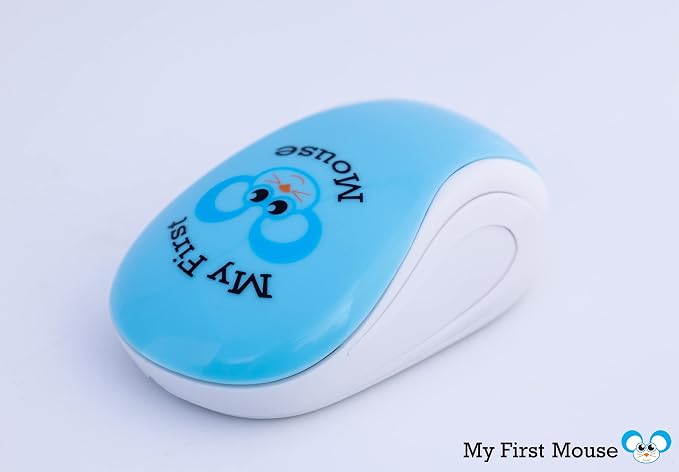
- SINGLE BUTTON: My First Mouse is designed without a scroll wheel or a right click button – which often frustrate young children when playing on a computer. The large single button enables kids to easily click with one finger or their entire hand.
- EASE OF USE: Complicated full-size mouse features have been purposely removed to create a simple, easy to use mouse for children. Tailored for little hands, our mouse ensures comfortable use for young learners, enhancing their computer interaction experience.
- KID-FRIENDLY DESIGN: Simplified with one click, this mouse is perfect for beginners, promoting confidence and ease in technology exploration.
- EDUCATIONAL COMPANION: Ideal for educational software and games, our mouse encourages interactive learning and computer literacy from a young age. Open a whole world of fun education games to your kids on a PC or a Mac.
- ADORABLE: My First Mouse is designed to be inviting and fun! Colorful, lightweight and with its own little “mouse” design to help kids learn computer terminology.
- WIRELESS CONVENIENCE: Easily connects via a standard USB port to any computer, laptop, desktop, tablet or other device. Simply open the top cover of the mouse and insert one AAA battery (Battery not included).
- SIMPLE TO USE: No complicated setups – just plug in and start using, making it suitable for children's quick and easy access to educational content. Adjust the size of your cursor on the screen for even better visibility.
- DURABLE & SAFE: Built to withstand enthusiastic usage, this mouse is both durable and safe, making it a reliable choice for kids' daily adventures in computing. My First Mouse is the perfect size for young children. Lightweight but sturdy construction is a perfect combination.
- ACCESSABILITY FOR ALL – Help others use a computer more conveniently! My First Mouse is ambidextrous and can be used by both Left handed and Right handed people.
- GREAT GIFT: My First Mouse arrives in a full retail package which is perfect for gift giving. My First Mouse is great for parents, teachers, school staff and more!
| Connectivity Technology | USB, Wireless |
| Additional Features | Portable, Wireless |
| Movement Detection | Laser |
| Button Quantity | 1 |
| Hand Orientation | Ambidextrous, Left, Right |
| Compatible Devices | Laptop, Personal Computer, Tablet |
| Operating System | Windows, Mac |
| Number of Batteries | 1 AAA batteries required. |
| Hardware Platform | Mac, PC |
| Power Source | Battery Powered |
| Range | 3.0 meters |
| Color | Colorful |
| Style Name | Modern |
| Theme | Children's Learning |
| Item Weight | 2 Ounces (56.7 grams) |
| Unit Count | 1.0 Count |
| Brand | Johnny World |
| Model Name | My First Mouse |
| Antenna Location | Tablet |
| Built-In Media | ["AAA Battery"] |
| Are Batteries Included | No |
| Are Batteries Required | Yes |
| Manufacturer | Johnny World |
| UPC | 850034693101 |
| Mfr Part Number | cd2 -1496 |
| Item Type Name | Computer Mouse |
| Enclosure Material | Plastic |
| Finish | Rubberized |
| Special Feature | Portable, Wireless |
| Movement Detection Technology | Laser |
What's in the box
["AAA Battery"]
Who Should Buy?

-
Young Children
Ideal for young children, offering a simple and intuitive design for easy navigation and learning.
-
Educational Use
Perfect for educational computer games, enhancing learning experiences through interactive play for early learners.
-
Parents and Caregivers
Designed for parents looking for safe, user-friendly devices to help children start using computers confidently.

-
Older Kids
Older children may require more advanced features and functionalities that this basic mouse does not offer.
-
Professional Use
Not suitable for professional environments where precision and multi-button functionality are necessary for productivity.
-
Gaming Enthusiasts
Advanced gamers might find this mouse limiting due to its single-click functionality and lack of customization options.
Product Description
Have any Query? Chat with us
Customer Questions & Answers
-
Question:
What is the purpose of My First Mouse?
Answer: My First Mouse is specifically designed for small hands and early learners to facilitate interaction with educational computer games and applications. Its single click functionality simplifies operations, making it ideal for preschoolers and young children who are just starting to explore the digital world. This focus on usability helps children feel empowered as they learn and engage with technology. -
Question:
Is My First Mouse compatible with all computers?
Answer: Yes, My First Mouse is designed to be compatible with most computers, including both Windows and Mac operating systems. The wireless feature ensures that it can connect easily to your device without the hassle of cords. This versatility makes it a perfect companion for educational tasks at home or in an early learning environment, allowing kids to use it seamlessly across different devices. -
Question:
How does a one-button design benefit early learners?
Answer: The one-button design of My First Mouse simplifies navigation for early learners, minimizing confusion that may arise with multiple buttons. This design approach aids in developing fine motor skills and enhances learning experiences without overwhelming them. As children learn to point and click, they gain confidence, which can lead to a more positive interaction with technology. -
Question:
Can My First Mouse be used for gaming purposes?
Answer: Absolutely! My First Mouse is perfect for educational computer games that promote learning while having fun. Its design is tailored to make it accessible and comfortable for young children, allowing them to improve their hand-eye coordination and problem-solving skills through interactive play. It's an excellent tool for enhancing their learning experience while engaging in their favorite games. -
Question:
What age group is My First Mouse suitable for?
Answer: My First Mouse is suitable for young children, typically aged between 3 to 7 years. Its ergonomically designed shape and one-click functionality cater specifically to the needs of early learners. This makes it an ideal tool for introducing technology to preschoolers, ensuring they develop essential skills at an appropriate level. -
Question:
Is My First Mouse portable for on-the-go learning?
Answer: Yes, My First Mouse is lightweight and compact, making it highly portable for on-the-go learning. This is perfect for parents and educators who want to facilitate learning outside traditional settings, such as during travel or visits to the park. Its wireless connectivity also means no tangles or fuss with cords, allowing for a hassle-free experience wherever you go. -
Question:
How does wireless connectivity enhance the user experience?
Answer: Wireless connectivity allows for a clutter-free workspace, significantly enhancing the user experience for children. With no cords to manage, young learners can freely navigate their surroundings and focus on their educational activities. This mobility is essential for fostering a creative and dynamic learning environment, where children can explore their interests without restrictions. -
Question:
Does My First Mouse require batteries?
Answer: Yes, My First Mouse is powered by standard batteries, which enables its wireless functionality. The design ensures that changing batteries is a straightforward process. This feature supports consistent usage without being tethered to a power source, allowing children to play and learn uninterrupted, fostering a deeper engagement with educational content. -
Question:
What type of surface is best for using My First Mouse?
Answer: My First Mouse works best on a flat surface, such as a mouse pad or a desk. Smooth surfaces help facilitate accurate tracking and responsiveness, enabling children to navigate their programs and games effectively. Ensuring that the right surface is used can enhance their overall experience, allowing for smoother movements and interactions with educational content. -
Question:
Where can I buy My First Mouse in Solomon Islands?
Answer: You can purchase My First Mouse from Ubuy in Solomon Islands. Ubuy offers a convenient platform for finding this product, ensuring that you can get it delivered right to your doorstep. Shopping on Ubuy also provides options to explore various features and customer reviews, helping you make an informed decision for your child's learning tools.
JohnnyWorld Gaming Mice Editorial Review


No editorial reviews found
Customer Reviews & Ratings
137 customers ratings
-
5 Star
63%
-
4 Star
13%
-
3 Star
9%
-
2 Star
8%
-
1 Star
7%
Review this product
Share your thoughts with other customers
Platform Trust & Buyer Confidence

MT
Mohd
Verified buyer
“The product received very good packaging & safe…Thank You”
16 June 2026 · via Trustpilot
SJ
Shawati
Verified buyer
“Accurate delivery timing given”
16 June 2026 · via Trustpilot
YB
Youcef
Verified buyer
“Not madly expensive like I thought, and much quicker than promised.”
15 June 2026 · via Trustpilot
LM
Leila
Verified buyer
“Never dealt with Ubuy before, but everything worked out great. Seamless cross border purchasing and shipping. Thanks!”
6/7/2026 · via Trustpilot
KA
Kwame
Verified buyer
“The process was smooth, with clear communication and timelines. This was my 1st purchase and I am really impressed. I will definitely be coming back.”
12 June 2026 · via Trustpilot
Secure Checkout
Global Delivery
Easy Returns
Genuine Products
Product Price History
Important information
- Limitations : For products shipped internationally, please note that any manufacturer warranty may not be valid; manufacturer service options may not be available; product manuals, instructions, and safety warnings may not be in destination country languages; the products (and accompanying materials) may not be designed in accordance with destination country standards, specifications, and labeling requirements; and the products may not conform to destination country voltage and other electrical standards (requiring use of an adapter or converter if appropriate). The recipient is responsible for assuring that the product can be lawfully imported to the destination country. When ordering from Ubuy or its affiliates, the recipient is the importer of record and must comply with all laws and regulations of the destination country.
- Not all the products listed on Ubuy are for sale, as Ubuy is a global search engine. Products are subject to export/trade regulations.
Currently unavailable.
We don't know when or if this item will be back in stock.
This item is not restrict in my country.(Please click on above link if this item is not restrict in your country, So our team will review and allow.)
Secured transaction
PCI DSS compliant and ISO 27001:2022 certified, with encrypted payments and full buyer protection on every order.
Our Top Logistics Partners
Fastest cross-border delivery
Features & Benefits
- Designed without a scroll wheel or right click button to create a simple, easy-to-use mouse for children.
- Use to supplement child's early learning and boost hand-eye coordination.
- Adorable kid-friendly design to make using computers more inviting and fun.
- Wireless connection via standard USB port to any device.
- Specially designed to fit small hands and help develop important skills for the future.
- Ambidextrous for both left and right-handed people and great for those with limited motor skills
Ubuy Assurance
Experience worry-free shopping with 100% original products, PCI DSS-compliant payment security, ISO 27001-certified data protection, the fastest cross-border delivery, free returns *, and secure packaging on every order.