0 ratings





Item #:
176486720
Pocket Printpod Bluetooth Mini Thermal Sticker Maker, Pink
88% of respondents would recommend this to a friend
Item #:
176486720
SBD 185
Price Details
Excluding Shipping & Custom charges ( Shipping and custom charges will be calculated on checkout )
*All items will import from US
In stock
 Imported from USA store
QTY:
Order now and get it around Thursday, October 01
Secured transaction
Ubuy works hard to protect your security and privacy. Our advanced payment security system ensures confidentiality by encrypting your information during transmission using AES (Advanced Encryption Standards) and SSL (Secure Socket Layer) protocols. Your payment details are 100% secure as we do not share your payment details with third party sellers.
Our Top Logistics Partners


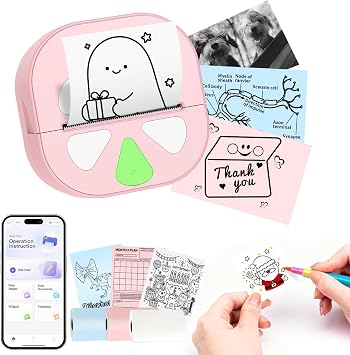
Creating stickers becomes as simple as sending a message.

Fast
Shipping

Free
Return*

Secure Packaging

100% Original Products

PCI DSS Compliance

ISO 27001 Certified



Note: Step Down Voltage Transformer required for using electronics products of US store (110-120). Recommended power converters Buy Now.


What Stands Out
Portable Design
Compact and lightweight, ideal for on-the-go printing. Perfect for small businesses and DIY enthusiasts seeking flexibility and ease of use in various environments.
Bluetooth Connectivity
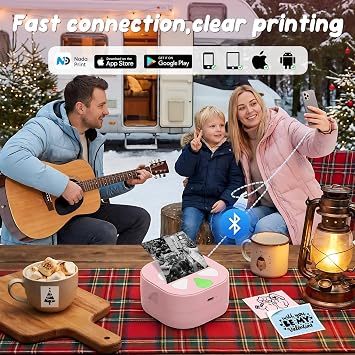
Seamlessly connects to smartphones for effortless printing. Ideal for users wanting instant access to print their graphics, notes, and lists without cumbersome setup or ink replacement.
Thermal Printing
Utilizes inkless thermal printing technology, providing cost-effective and mess-free operation. Perfect for environmentally conscious users looking for sustainable printing solutions without sacrificing quality.
Product Details
| Printer Type | Thermal |
| Other Special Features of the Product | Portable |
| Printer Output Type | Monochrome |
| Item Weight | 5.76 ounces (163.3 grams) |
| Item Dimensions D x W x H | 4.1"D x 8.58"W x 8.48"H (10.4 x 21.8 x 21.5 cm) |
| Print media | Thermal Paper |
| Maximum Copy Speed Black and White | 60 pages_per_minute |
| Ink Color | No ink required |
| Additional Printer Functions | Print Only |
| Resolution | 203 x 203 dpi |
| B&W Pages per Minute | 60 pages_per_minute |
| Color | Pink |
| Maximum Print Resolution Black and White | 203 dots_per_inch (515.6 cm) |
| Duplex | Simplex |
| Brand | HKHKPI |
| Model Name | D20 sticker maker |
| Model Number | D20 sticker printer |
| Built-In Media | Labels |
| Model Series | D20 |
| Unit Count | 1 Count |
| Manufacturer | HKHKPI |
| Maximum Media Size | 0.55inches (1.4 cm) |
| Maximum Sheet Capacity | 10 |
| Paper Size | 0.59 inches (1.5 cm) |
| Printer Connectivity Type | Bluetooth |
| Maximum Copy Resolution Black and White | 203 dpi |
| Connectivity Technology | Bluetooth |
| Printing Technology | Thermal |
| Special Feature | Portable |
| Printer Output | Monochrome |
| Max Printspeed Monochrome | 60 pages_per_minute |
| Product Dimensions (L x W x H) | 4.1"D x 8.58"W x 8.48"H (10.4 x 21.8 x 21.5 cm) |
What's in the box
Labels
Who Should Buy?

-
Small Business Owners
Great for creating labels, promotional materials, and product tags quickly and efficiently without needing traditional ink.
-
Students and Educators
Ideal for printing study graphics, notes, and classroom materials, enhancing organization and visual learning.
-
DIY Enthusiasts
Perfect for crafting personalized stickers for journals, planners, and home decor projects, adding creative flair.

-
Professional Graphic Designers
Limited color capabilities and resolution may not meet the high-quality standards required for detailed design work.
Product Description
Have any Query? Chat with us
Customer Questions & Answers
-
Question:
What types of stickers can I create with the Mini Print Pods Printer?
Answer: The Mini Print Pods Printer is versatile and can create various types of stickers, including labels for products, graphics for personal projects, and notes for study purposes. Its thermal inkless printing technology allows you to print in high quality without the need for ink, which makes it an eco-friendly option. You can use it to print stickers for your small business to brand your products or create personalized notes for your school projects. The Bluetooth connectivity makes it convenient to operate from your smartphone or tablet. -
Question:
How does Bluetooth connectivity work with the Mini Print Pods Printer?
Answer: The Mini Print Pods Printer features Bluetooth connectivity that allows you to pair the printer with your smartphone or tablet effortlessly. To get started, simply download the manufacturer's app, connect your device via Bluetooth, and start sending your designs directly to the printer. This wireless functionality eliminates the hassle of using cumbersome cables and enhances portability. Whether you are at home, in a classroom, or on the go, you can easily create and print stickers whenever inspiration strikes. -
Question:
Is the Mini Print Pods Printer suitable for small businesses?
Answer: Yes, the Mini Print Pods Printer is an excellent choice for small businesses. Its compact design and portability allow you to easily produce custom stickers and labels on-demand. With its thermal printing technology, you save money on ink costs while still delivering high-quality prints to customers. This can be particularly useful for product labels, packaging, or promotional offers. Using this printer can enhance your brand visibility and reputation by providing unique, professional-looking stickers. -
Question:
Can I use the Mini Print Pods Printer for educational purposes?
Answer: Absolutely! The Mini Print Pods Printer is perfect for educational settings. It enables students and teachers to create study materials such as graphics, labels for organizing supplies, or personalized flashcards for effective learning. The ability to print without ink makes it a cost-effective solution for classroom projects and presentations. This printer can cater to various scenarios, from preparing materials for a science fair to designing custom stickers for school events. -
Question:
What is thermal inkless printing and how does it benefit the user?
Answer: Thermal inkless printing is a technology that uses heat to transfer images onto the paper, eliminating the need for ink cartridges. This method not only reduces costs but also minimizes maintenance associated with traditional printers. The Mini Print Pods Printer uses this technology, ensuring high-quality, smudge-proof stickers that are vibrant and long-lasting. For users, this means more convenience and less hassle, allowing you to focus on creativity rather than worrying about running out of ink. -
Question:
What paper types are compatible with the Mini Print Pods Printer?
Answer: The Mini Print Pods Printer is compatible with specially designed sticker paper that can handle thermal printing. It's ideal for photo-quality adhesive sheets, which provide a great surface for vibrant colors and detailed images. User should look for thermal sticker paper that suits their specific needs, whether it's for marketing materials, personal projects, or educational resources. This flexibility allows you to choose the right materials for your stickers, enabling better results tailored to your requirements. -
Question:
How do I set up the Mini Print Pods Printer?
Answer: Setting up the Mini Print Pods Printer is straightforward. Begin by fully charging the printer and ensuring that you have the right sticker paper loaded. Next, download the corresponding app for your device, then follow the on-screen instructions to connect via Bluetooth. Once paired, you can start creating your designs within the app and send them to the printer for instant sticker production. This user-friendly setup makes it accessible for anyone, from tech-savvy users to beginners. -
Question:
Can I print photos with the Mini Print Pods Printer?
Answer: Yes, you can print photos with the Mini Print Pods Printer. Its thermal technology delivers high-quality images that are vibrant and sharp, making it suitable for personal photos, graphics, or art. The printer's design allows for various sizes and shapes of stickers, giving you the flexibility to choose how you want to display your images. Whether creating custom stickers for events or personalizing journals, this printer supports your photographic needs effectively. -
Question:
Is the Mini Print Pods Printer portable?
Answer: The Mini Print Pods Printer is designed for portability, making it easy to take anywhere. Its compact size and lightweight design mean you can easily fit it into a bag for on-the-go sticker printing. This feature is particularly beneficial for small business owners who need to print labels during travel or students who want to produce materials out of the classroom. With the Mini Print Pods Printer, you’re not limited to one location, empowering creativity wherever you are. -
Question:
Where can I buy the Mini Print Pods Printer?
Answer: You can purchase the Mini Print Pods Printer through Ubuy, a reliable online platform that offers a variety of products including this sticker printer. Ubuy provides an efficient shopping experience, featuring a user-friendly interface and secure payment options. They also have a range of shipping options to cater to your needs in Solomon Islands, ensuring that you can quickly get your hands on this innovative sticker printer for your personal or business use.
HKHKPI Portable Thermal Printers D20 sticker printer Editorial Review


**Editorial Review** The Sticker Printer - Mini Print Pods Printer, also known as the D20, offers an impressive blend of portability, functionality, and value, especially for those seeking a compact solution for creating labels and small prints. With an affordable price tag under $20, the D20 impresses with its solid Construction and ease of use. Users frequently commend the simplicity of the setup process, emphasizing the app's role in connecting the printer via Bluetooth. The app, although lacking comprehensive tutorials, provides an intuitive user experience with built-in templates for various applications, from to-do lists to QR codes. The printer is powered by a rechargeable battery and connects via USB-C, eliminating the need for traditional ink. Print quality, while generally satisfactory for text and basic shapes, does present some limitations. The D20 is Constrained to black and white output, and images can appear pixelated, reminiscent of dot matrix quality. However, the clarity for printing text is likened to that of traditional cash register receipts, making it quite suitable for practical labeling tasks. The continuous adhesive rolls, which are available in various colors, allow for flexibility in size, enabling users to cut stickers to their desired length easily. While some users noted that the app's limited design options could be a drawback, many found the D20 to be a handy tool for various needs beyond just crafting stickers, such as creating shipping labels and organizing materials. The overall sentiment indicates that, once users navigate the initial learning curve regarding both the printer and app features, the D20 becomes a fun and versatile gadget that exceeds expectations for its price range. In conclusion, the D20 mini printer is a fantastic buy for anyone seeking a portable, efficient, and user-friendly solution for on-the-go printing tasks, provided they are comfortable with its black and white limitations. **
Customer Reviews & Ratings
183 customers ratings
-
5 Star
71%
-
4 Star
12%
-
3 Star
3%
-
2 Star
9%
-
1 Star
5%
Review this product
Share your thoughts with other customers
Pros
- Compact and portable design
- Easy setup and connectivity through the intuitive app
- Versatile functionality for creating various labels and stickers
- Rechargeable battery with USB-C charging
- Excellent value for the price
Cons
- Limited to black and white printing
Platform Trust & Buyer Confidence

JK
Jasmin
Verified buyer
“Great products and very good service: very easy and very fast international delivery.”
9 September 2026 · via Trustpilot
AG
Anke
Verified buyer
“Wonderful online shopping experience, smooth transaction from the start. Payment method works conveniently and delivery is unexpectedly fast and reliable. You go the extra mile for service. What makes this even more amazing, you deliver to Namibia. I will remain a happy Ubuy customer and will increase my purchases for sure! Thank you!”
10 September 2026 · via Trustpilot
H
Hazel
Verified buyer
“Very easy to find the products what you need, and so fast delivery, that’s why I highly recommended to others costumers to used ubuy.”
10 September 2026 · via Trustpilot
O
Opaleye
Verified buyer
“I received exactly what I ordered I was skeptical about your site because that was my first time to order. But the order came timely and neatly packaged. I was not disappointed. Thank you.”
11 September 2026 · via Trustpilot
AC
Adele
Verified buyer
“Easy to find and order what you want on the website. Delivery is quick to the UK”
8 September 2026 · via Trustpilot
Secure Checkout
Global Delivery
Easy Returns
Genuine Products
Product Price History
Important information
- Limitations : For products shipped internationally, please note that any manufacturer warranty may not be valid; manufacturer service options may not be available; product manuals, instructions, and safety warnings may not be in destination country languages; the products (and accompanying materials) may not be designed in accordance with destination country standards, specifications, and labeling requirements; and the products may not conform to destination country voltage and other electrical standards (requiring use of an adapter or converter if appropriate). The recipient is responsible for assuring that the product can be lawfully imported to the destination country. When ordering from Ubuy or its affiliates, the recipient is the importer of record and must comply with all laws and regulations of the destination country.
- Not all the products listed on Ubuy are for sale, as Ubuy is a global search engine. Products are subject to export/trade regulations.
SBD 185
Order now and get it around Thursday, October 01
This item is not restrict in my country.(Please click on above link if this item is not restrict in your country, So our team will review and allow.)
QTY:
Secured transaction
PCI DSS compliant and ISO 27001:2022 certified, with encrypted payments and full buyer protection on every order.
Our Top Logistics Partners
Fastest cross-border delivery
Features & Benefits
- Wireless Bluetooth connectivity for instant printing from your smartphone.
- Automatic size detection eliminates manual adjustments.
- Sharp, smudge-free prints with no need for ink or toner.
- Access to a vast library of fonts and icons for creative designs.
- Portable design with a rechargeable battery, perfect for on-the-go use.
- Strong-adhesive stickers that work on multiple surfaces and are water-resistant.
Ubuy Assurance
Experience worry-free shopping with 100% original products, PCI DSS-compliant payment security, ISO 27001-certified data protection, the fastest cross-border delivery, free returns *, and secure packaging on every order.